Adobe crams multiple AI tools into its experimental camera app
Adobe is adding generative AI features to Project Indigo, including object removal, style changes, photo guidance and prompt-based edits.
Intelligence analysis by GPT-5.4 Mini
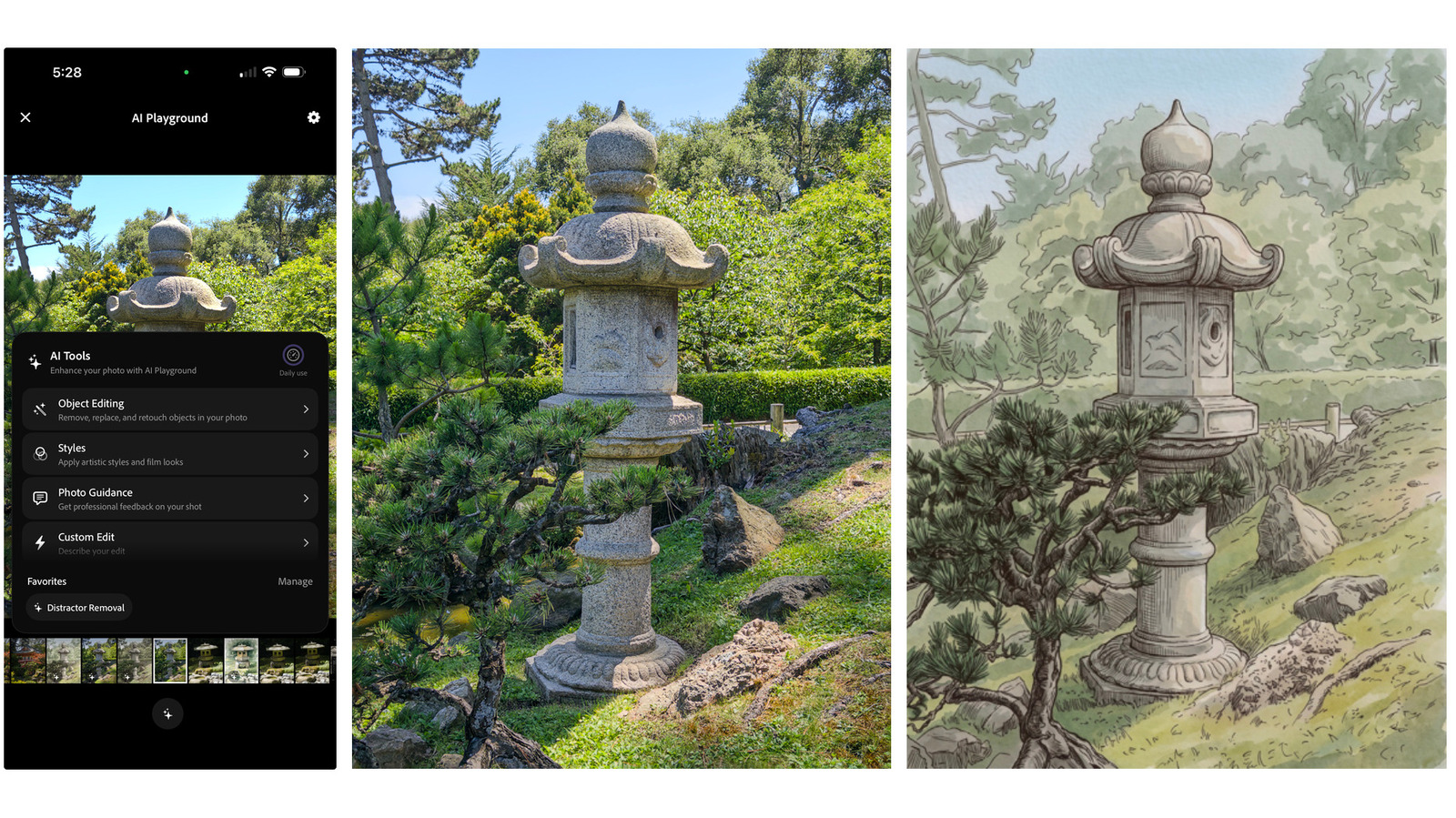
Project Indigo, Adobe's experimental camera app, is moving beyond its original natural-photo pitch and into AI-assisted capture and editing. The new AI Playground tests how much generative help photographers want at the moment they shoot.
Adobe is adding a smart helper to its camera app. It can erase things, change photo styles, and even tell someone how to take a better picture, like a coach that also has a paintbrush.
Analysis
Adobe Is Testing a New Identity for Indigo
Project Indigo was originally framed as a camera app for smartphone photographers who wanted a more natural, SLR-like look. This update suggests Adobe is willing to widen that idea into something more ambitious and more crowded with AI tools.
That matters because it changes the product's center of gravity. Instead of serving only people chasing a cleaner capture experience, Indigo is now being used to explore how generative AI can shape photos at the point of capture.
What AI Playground Actually Adds
Adobe's new AI Playground groups the experience into Object Editing, Styles, Photo Guidance and Custom Edit. Those sections cover practical tricks like removing people, cars or signs, blurring backgrounds, changing a photo into a painted or drawn style, and getting critique or suggestions before the next shot.
The Custom Edit feature is the clearest sign that Adobe wants this to be more than a preset filter system. By letting users prompt changes, the app moves closer to conversational image editing, where the user describes an outcome and the model tries to produce it.
Free For Now, But Not For Long
Adobe says it is using Google's Nano Banana model for the current version, but it could switch to other models later. That gives Adobe flexibility, but it also shows how dependent these experiences are on model quality and availability behind the scenes.
The rollout is intentionally narrow: the feature is free, but only for a small share of users and only for a few weeks. Adobe has also already said it cannot keep it free forever, which signals that the company is likely testing both product demand and willingness to pay before expanding it.
The tension here is obvious. If the AI features are useful, Indigo could become a more compelling creative tool and a stronger part of Adobe's mobile strategy. If they feel bolted on, the app risks drifting away from the simple photography experience that made it interesting in the first place.
Key points
- Adobe is adding generative AI features to its Project Indigo camera app.
- AI Playground includes object removal, style changes, photo guidance and prompt-based custom edits.
- The company says it is currently using Google's Nano Banana model.
- The feature is free for now but limited to a small group of users for a short time.
- Adobe says a paid version may come later if the feature proves popular.
If the experiment works, Project Indigo could become a powerful all-in-one photo tool that helps people shoot and edit faster. Adobe could also learn which AI features people actually want before expanding them to more users.
The app could lose the simple, natural feel that made it stand out in the first place. Since Adobe says the feature cannot stay free forever, users may also end up facing a paid version after the trial ends.