How to use Claude's voice mode
Anthropic's chatbot Claude can be used in voice mode, allowing users to speak to it instead of writing out prompts. The feature is available through the Claude mobile and desktop apps, as well as through the web. Voice mode works best from a phone and uses a 'turn-based' …
Intelligence analysis by Llama
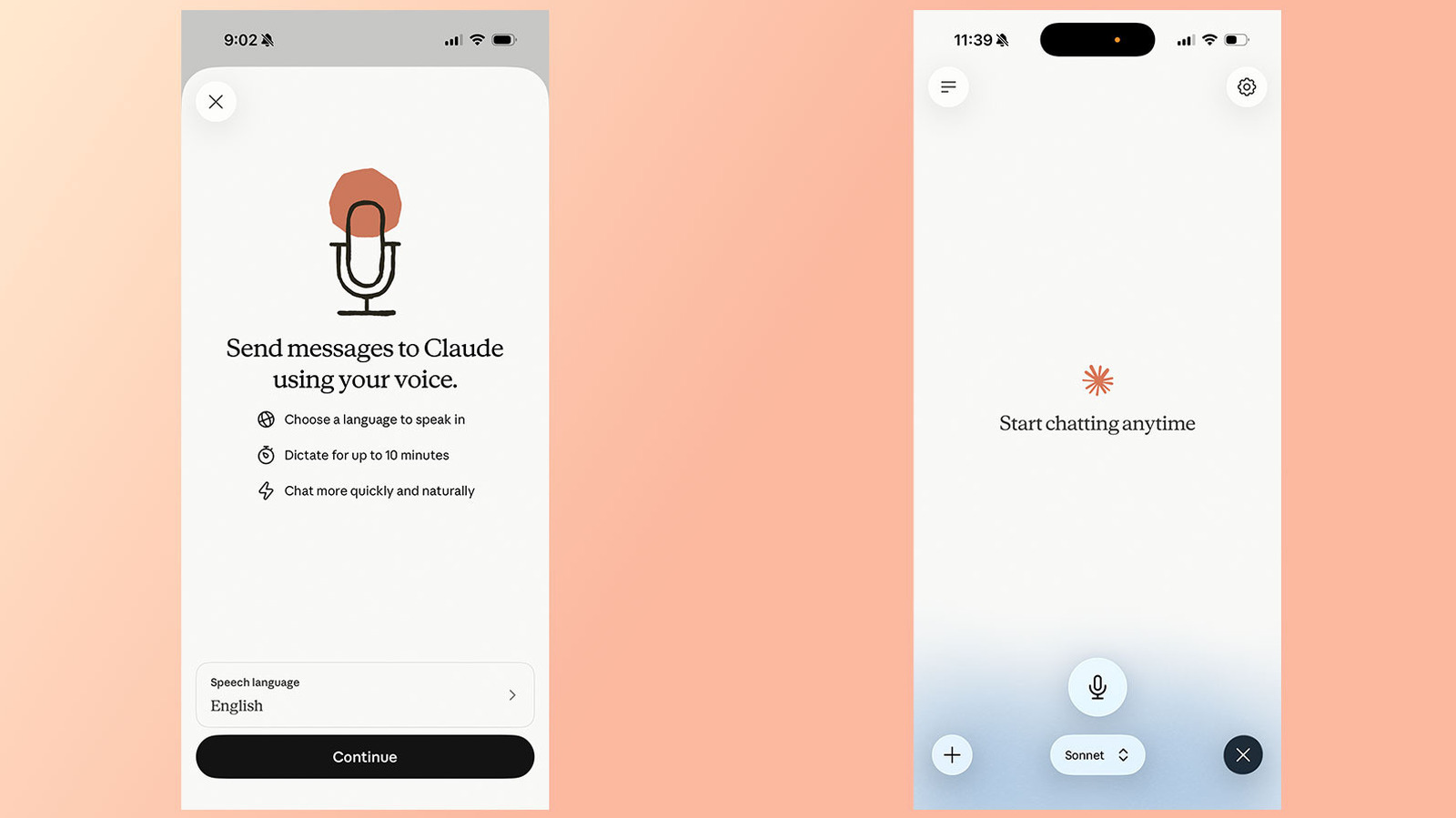
Claude's voice mode is available through the Claude mobile and desktop apps, as well as through the web. It uses a 'turn-based' architecture, meaning the chatbot will listen to the user before generating a response. Users can change the model Claude will use to generate a response from the model picker at the bottom of the interface.
Claude's voice mode is like talking to a friend. You can ask it questions and it will answer you. It's like having a conversation with a computer. You can even ask it to do things for you, like summarize your emails.
Analysis
Voice Mode Overview
Anthropic's chatbot Claude can be used in voice mode, allowing users to speak to it instead of writing out prompts. This feature is available through the Claude mobile and desktop apps, as well as through the web. Voice mode works best from a phone and uses a 'turn-based' architecture, meaning the chatbot will listen to the user before generating a response.
Selecting Different Models
Users can change the model Claude will use to generate a response from the model picker at the bottom of the interface. The available models are Haiku, Sonnet, and Opus. Haiku is the fastest model for quick answers, Sonnet is the most efficient for everyday tasks, and Opus is for complex tasks, available only to paid accounts.
Using Connected Apps
Like with text chat, voice mode can access apps and services users have connected to Claude, including Gmail, Google Calendar, and Slack. For example, users can ask Claude to summarize their recent emails. Simply tell Claude the app they want it to use as part of a prompt. If users are accessing a third-party app for the first time, they will need to grant Claude permission to use it.
Changing Claude's Voice and Language
As of July 2026, Anthropic offers Voice Mode support in 14 different languages, with a handful of those available in additional dialects. The language users select will affect their choice of Claude's voice. In English, for instance, users can select from five different options, while Japanese users are limited to just two. One limitation of Voice Mode is that Claude cannot detect if users switch between languages mid-sentence. If users are about to speak in another language, they should state that intent out loud, or change Claude's language from the Settings menu.
Limitations of Voice Mode
One limitation of Voice Mode is that Claude cannot detect if users switch between languages mid-sentence. If users are about to speak in another language, they should state that intent out loud, or change Claude's language from the Settings menu. Additionally, users should note that Claude's voice mode uses a 'turn-based' architecture, meaning the chatbot will listen to the user before generating a response. This is different from ChatGPT's voice mode, which OpenAI recently updated to use a 'duplex' architecture.
Key points
- Claude's voice mode is available through the Claude mobile and desktop apps, as well as through the web.
- Voice mode works best from a phone and uses a 'turn-based' architecture, meaning the chatbot will listen to the user before generating a response.
- Users can change the model Claude will use to generate a response from the model picker at the bottom of the interface.
- Voice mode can access apps and services users have connected to Claude, including Gmail, Google Calendar, and Slack.
- Claude's voice mode supports 14 different languages, with a handful of those available in additional dialects.
If Claude's voice mode continues to improve, it could become a game-changer for people who struggle with writing or have difficulty using text-based interfaces. It could also enable new forms of interaction and collaboration, such as voice-based brainstorming sessions or voice-controlled presentations.
However, there are also potential risks associated with voice mode, such as the possibility of misinterpretation or miscommunication. If users are not careful, they may inadvertently provide sensitive information or make mistakes that could have serious consequences.