Sonos put speaker controls on your iPhone's lock screen (again)
Sonos has released an app update that brings speaker playback controls back to the iPhone lock screen via Apple's Live Activities system, three years after the original integration broke.
Intelligence analysis by Llama
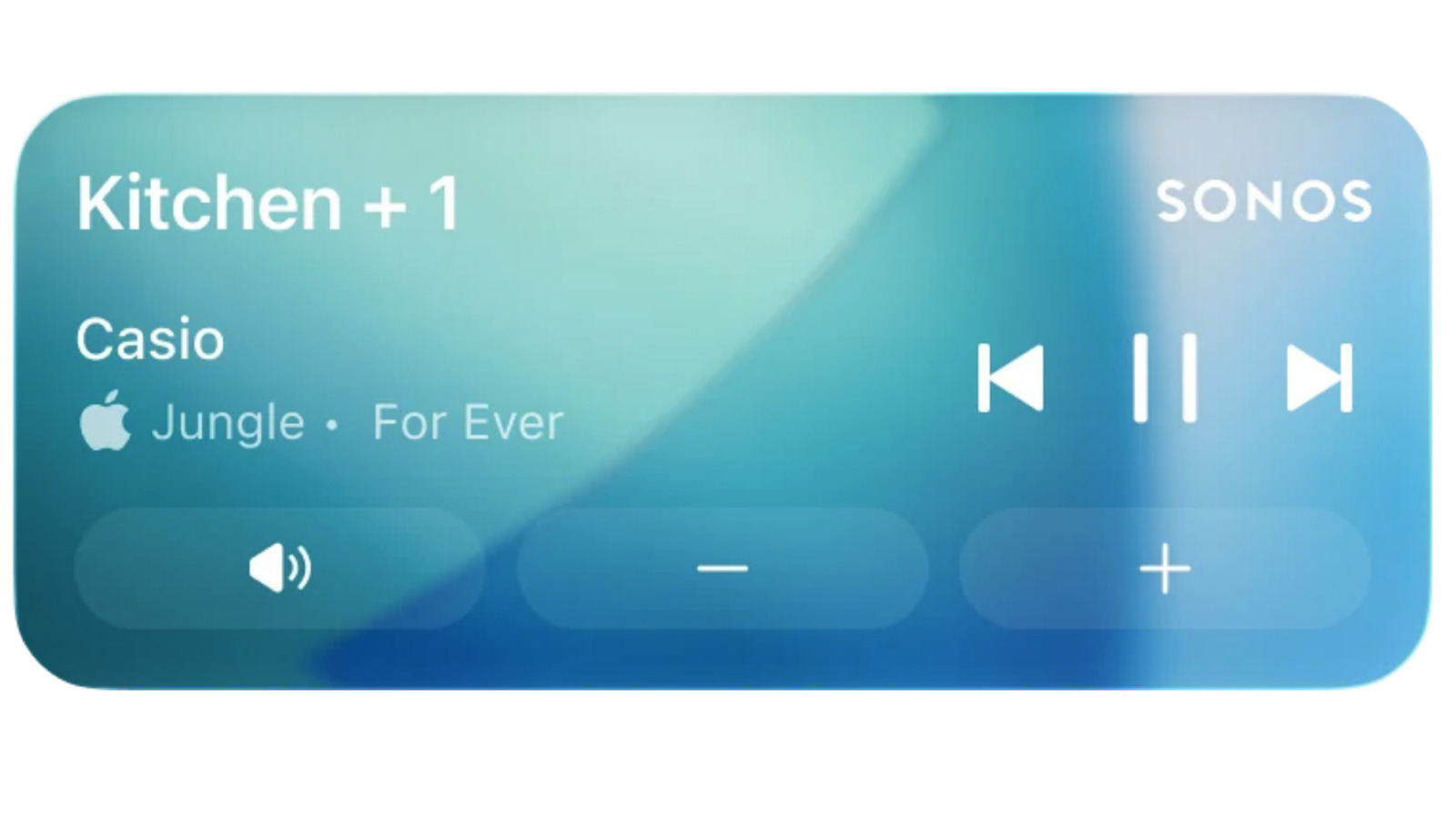
Sonos restored iPhone lock screen controls through Apple's Live Activities framework, a feature the company had to pull in 2023. The update ships in app version 80.16.32 with zone creation and alarm snoozing, though album art and CarPlay/Apple Watch adjustments remain absent.
Sonos makes speakers that play music. A few years ago, you could see and change the song from your phone's lock screen without unlocking the app, but that option disappeared. Sonos just fixed it, so now your lock screen shows what's playing and lets you adjust the volume, kind of like having a tiny music remote sitting right on top of your phone.
Analysis
Apple's Live Activities system
The new lock screen integration is powered by Apple's Live Activities framework, which Apple introduced to provide persistent, glanceable updates from apps without requiring users to open them. By building on Live Activities, Sonos can now display what is currently playing on a connected speaker directly on the locked iPhone screen, alongside basic playback controls. This approach replaces the older method that Sonos used for nearly a decade, which the company says stopped working after Apple updated its design framework.
Aligning with Live Activities positions Sonos to stay compatible as Apple continues to evolve iOS, rather than scrambling to rebuild integrations after each platform revision. It also means the lock screen experience is bound to the same constraints as other Live Activities, including the 15-minute auto-dismiss after playback stops and the requirement to authenticate with Face ID or a passcode before making any adjustments.
The 2023 removal and 2024 redesign
Sonos first shipped lock screen controls in 2016, but the company pulled the feature in 2023 once its underlying integration no longer fit Apple's updated design framework. Shortly afterward, Sonos rolled out what it has since admitted was a disastrous app redesign, which stripped out volume controls, queue management, reliable connection handling and other essentials. The subsequent scramble to repair those basics pushed lock screen support to the back of the queue for years.
Since then, Sonos has methodically rebuilt the app through a series of updates, gradually restoring queue management, local library reliability and other core features. The lock screen return is the latest step in that recovery arc and suggests the app's foundations are now solid enough that the company can spend engineering effort on convenience features again. For longtime Sonos owners, it closes a loop that has been open since the pre-redesign era.
App version 80.16.32
The feature ships in Sonos app version 80.16.32, released simultaneously for iOS and Android, although only the iOS build gains lock screen controls because Live Activities is platform-specific. The same update introduces the ability to create zones for select players, an in-app alarm snooze, and updates to the System Settings management interface. Sonos says it is exploring alternative ways to bring album art to the lock screen, an absence that is noticeable compared with most music apps.
Playback information does surface on CarPlay and Apple Watch, but Sonos notes that controls are not yet supported on those surfaces, meaning users can only view what is playing, not change it. Combined with the Face ID or passcode requirement on the phone, the current implementation is more limited than what competing music apps offer. Still, the update represents a tangible deliverable on a feature the company itself called "much requested, anticipated and needed."
Key points
- Sonos app version 80.16.32 brings iPhone lock screen playback controls back via Apple's Live Activities system
- The feature was first added in 2016 and removed in 2023 after Apple's design framework changed, with support deprioritized during the 2024 app redesign
- Adjusting volume or skipping tracks requires the phone to be unlocked via Face ID or passcode, and the live activity disappears 15 minutes after playback stops
- Album art is not yet supported on the lock screen, and CarPlay and Apple Watch show playback info but do not allow adjustments
- The same update adds zone creation for select players, in-app alarm snoozing and System Settings management changes
With the Live Activities foundation in place, Sonos can iterate quickly to add album art, full CarPlay adjustment support and Apple Watch controls in future updates. Continued stability work could help the company rebuild the consumer trust that eroded after the 2024 redesign and demonstrate that the app can once again be a reason to buy Sonos hardware rather than a reason to avoid it.
The current feature has notable gaps: no album art, no adjustments on CarPlay or Apple Watch, and a 15-minute auto-dismiss that can cut off the live activity mid-session. The requirement to authenticate with Face ID or a passcode before changing volume or skipping tracks also blunts the convenience, and given Sonos's recent track record of app regressions, some users may wait for further updates before relying on the integration.